Guide
Agentic workflow observability beyond tracing
A green trace means the pipeline ran, but it does not mean the job succeeded. You still need a clear product goal and inspectable evidence on that same run.
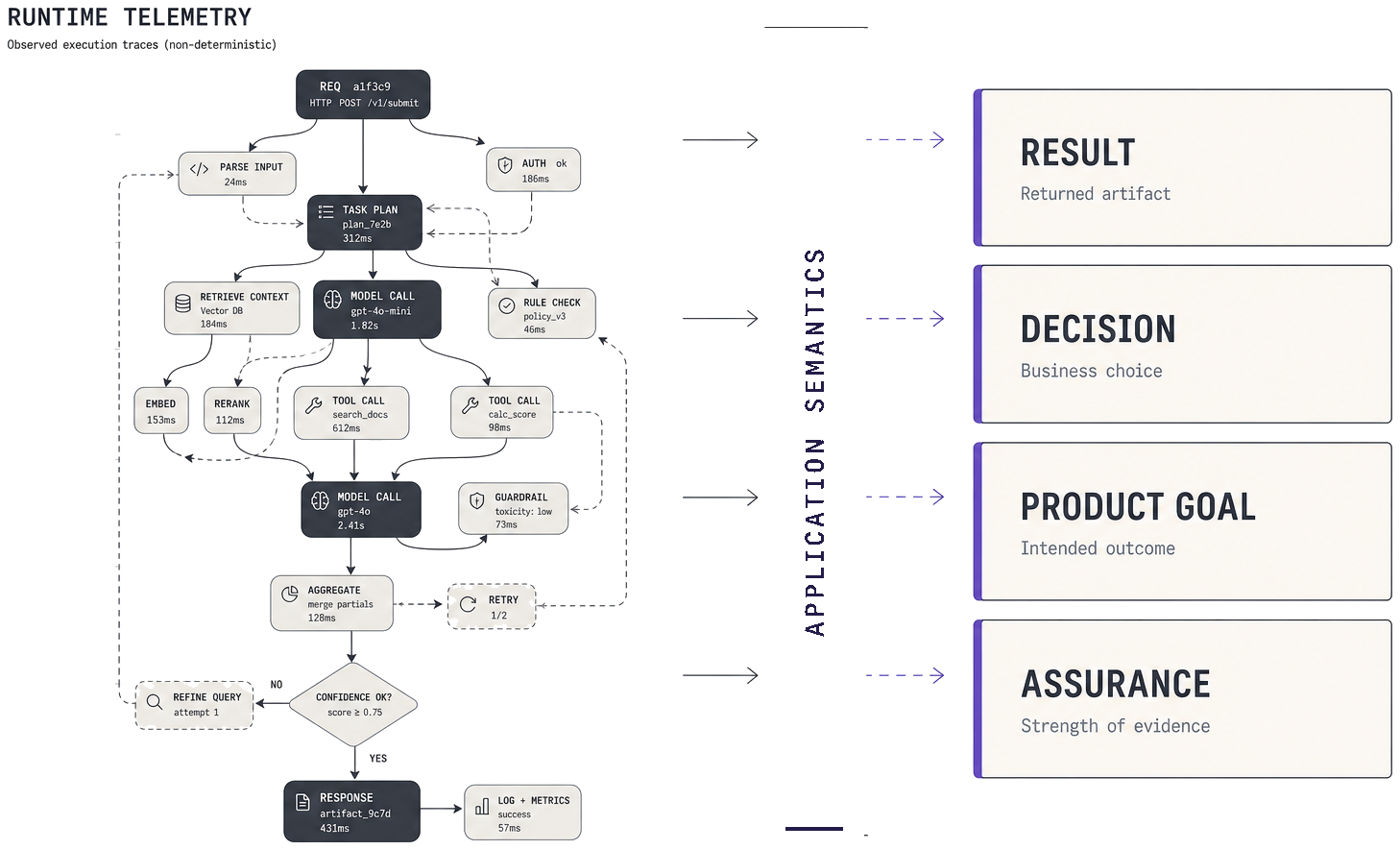
Four layers
Observability for agents means seeing more than spans: what ran, how good it was, what it cost, and whether the job was done. These four layers answer different questions on the same run.
Teams need all four on one run; three tools and a spreadsheet are not the same thing. When data lives apart, you guess. When it shares one run identity, you can decide with less doubt.
Tracing
What executed? Spans, tools, models, retries, timing.
Evaluation
Quality vs criteria? Rubrics, golden sets, online scores.
Cost
What did it spend? Tokens and tools on the same run.
Product outcomes
Was the job done? Declared goal + evidence you can inspect.
What this means in practice
Picture one agent run from start to finish. You look at the same run four ways, and each layer asks one concrete question about that execution.
First comes tracing: you see which steps ran, plus tools, models, retries, and timing. A green path here only says the code finished, not that the product job succeeded.
Next comes evaluation. You score the output against criteria you chose, but a high score still needs a job that you named up front.
Then comes cost. You attach tokens and tool spend to that same run, because spend without a goal is only a bill.
Last comes the product outcome. You ask whether you met the goal you wrote down, and you keep fields that show why. That is the layer most stacks still leave informal or scattered.
Example: false success
Pipelines can finish every step and still miss the product job. HTTP 200 and finished spans are necessary, but they are not enough on their own.
Trace
Looks healthy
- Retriever ran
- LLM call finished
- HTTP 200 OK
Everything ran as planned.
Product goal
Still failed
Empty or ungrounded answer
Runtime OK. Job not done.
This is a false success: the runtime looks fine, yet the user still gets an empty or ungrounded answer. Operations may think the system is healthy while product knows the job failed.
Without a named goal on the run, you cannot tell those stories apart. You only see green spans, so you miss the failure that matters to users.
A product goal is a short, shared rule for what “done” means. Evidence is the fields that prove pass or fail for that run, and you should keep both next to the trace.
Then a review can ask whether you spent money on a real win, or whether you paid for a clean failure that still looked healthy in tracing.
Anti-patterns
These shortcuts look like monitoring but skip outcomes, so each one answers the wrong question. Green spans alone are not enough, a lone score is not enough, and spend without a named job creates false trust.
Trace only
Green spans with no declared product goal.
Score only
An eval number without a job definition.
Cost without goal
Spend tracked without asking what was achieved.
Fix the habit, not just the chart: name the job, attach evidence, and join cost to that same run.
Example: grounded RAG contract
A small contract in the repo makes success easy to inspect next to the pipeline, instead of hiding the rule behind a dashboard switch alone.
The sample below names an artifact, a decision, and a product goal. Pass means the answer is present and grounding is true, and that rule can sit in git with the code.
version: 1
service:
  name: grounded-rag
  runtime: haystack
contracts:
  grounded_answer:
    artifact:
      name: Grounded answer
      valid:
        non_empty: $.answer
    decision:
      name: Grounding decision
      expected: true
      observed: $.grounded
    product_goal:
      name: Successful grounded answer
      achieved:
        all:
          - $.witdem.artifact_valid
          - $.witdem.decision_correct
What to measure
If you keep only four habits, make them these, because they make pass and fail explainable later. Use the same definition in the repo, keep evidence on the run, and join cost to that outcome.
Named goal
Same definition in-repo for every engineer.
Evidence
Fields that explain pass/fail on that run.
Cost × goal
Spend joined to the run you scored.
No silent judge
Name and version any LLM-as-judge.
Write the goal once and reuse it in reviews. Do not invent a new meaning of “good” inside every tool.
What outcome analytics looks like
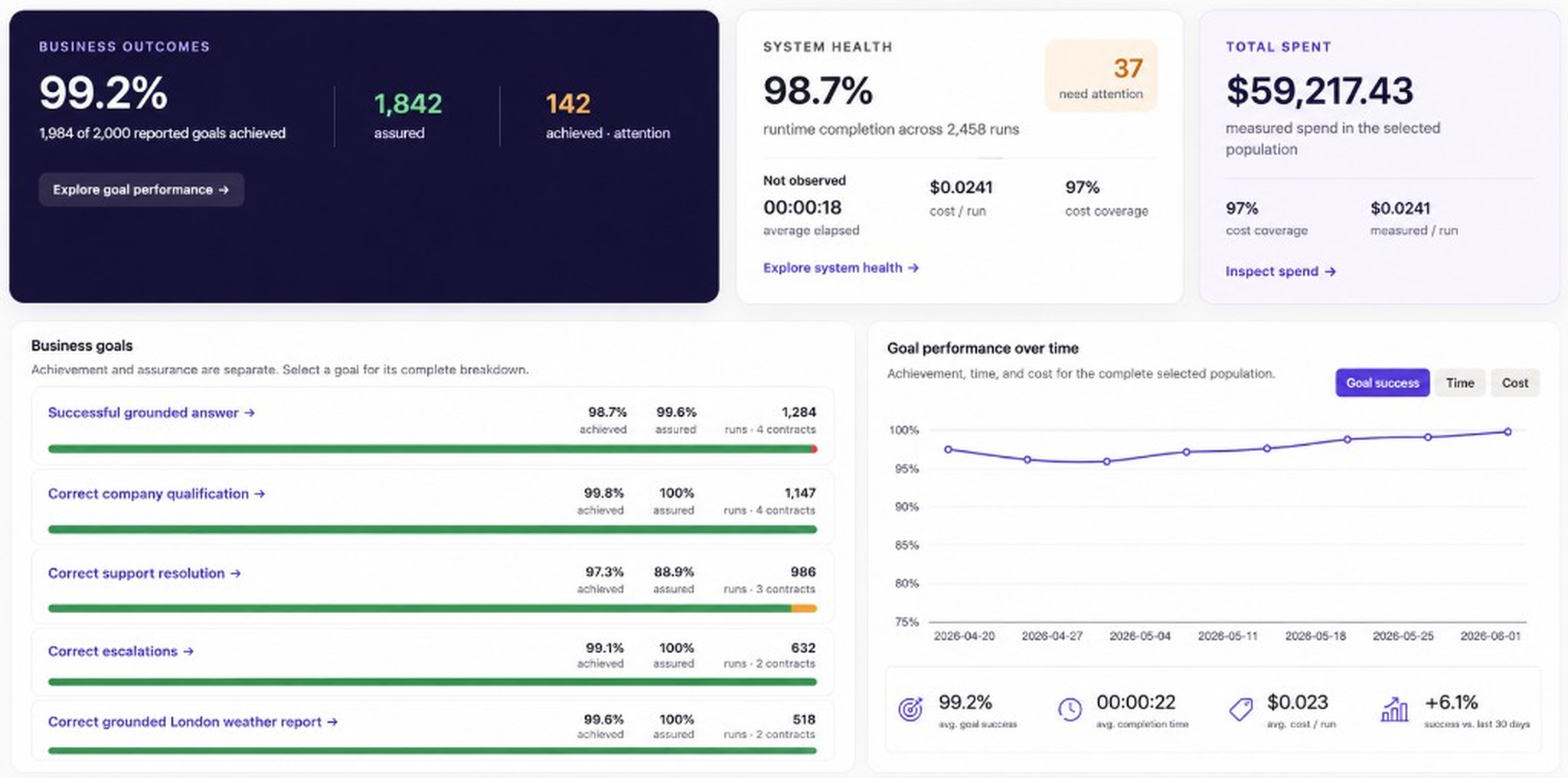
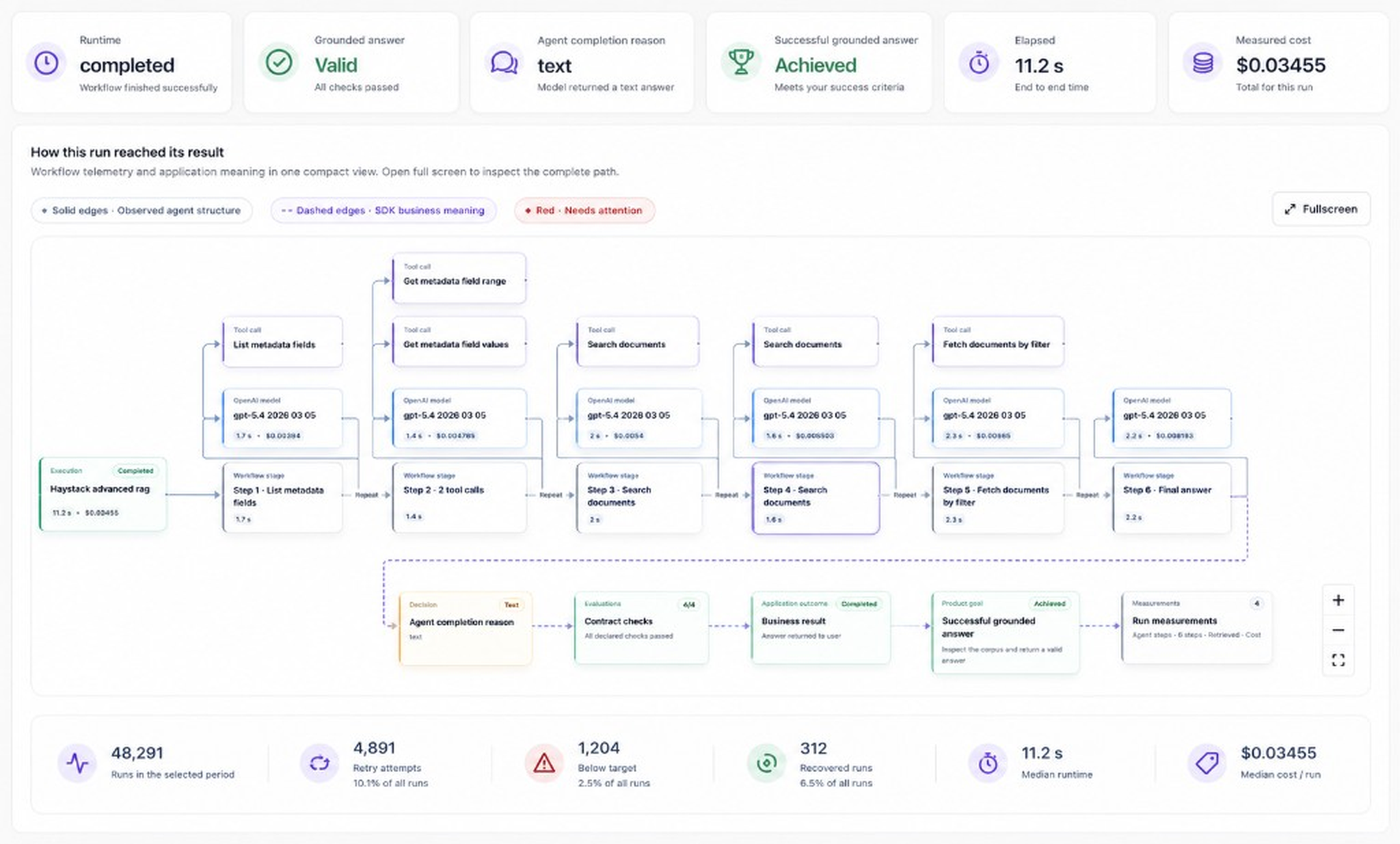
Dashboards help when goal, evidence, and cost share one run identity. The screens below come from Witdem; the pattern matters more than the vendor.
You want one place that shows whether the goal was met, why, and at what spend. Path replay helps when you need the steps next to that call.

Tool landscape
Tracing tools are strong, and evaluation tools are strong too. Outcomes joined to cost on the same run are often still informal or split across sheets.
The gap is simple to name: join outcome evidence to spend on the same run. Keep tracing and evaluation, then add the missing link.
Tracing
Langfuse · LangSmith · Phoenix
Evaluation
Braintrust and similar
Outcomes + cost×goal
Often still informal or split
Implementation note
This sits beside tracing and evaluation as a soft placement, not a hard sell. Contracts state the goal without replacing your stack.
Witdem is one option: contracts in .witdem/witdem.yaml on Haystack, LangGraph, and similar. Not an orchestrator. Goal + evidence + cost beside tracing and eval — not instead of them.
Start with one named goal on one flow, attach evidence fields, review spend against that goal, and then expand.
FAQ
Is tracing the same as product outcomes? No. Tracing shows what ran; outcomes ask whether the job you named was done. You need both on the same run.
Do you replace Langfuse or similar tools? No. Keep your tracing stack and add a clear goal with evidence next to it. Outcome analytics sits beside tracing and evaluation.
What is a product goal? A short, shared rule for “done” that lives in the repo. Evidence is the fields that show pass or fail for that run.
Who is this for? Teams that ship agent workflows and need more than green spans — platform, ML, and product folks who share one definition of success.
Framework guides: Haystack · LangGraph · LangChain · OpenAI Agents · Case study: Document intake · Layers: Tracing, evaluation, product analytics · Alongside: Langfuse · LangSmith · Phoenix